What good help is worth
The same question, again
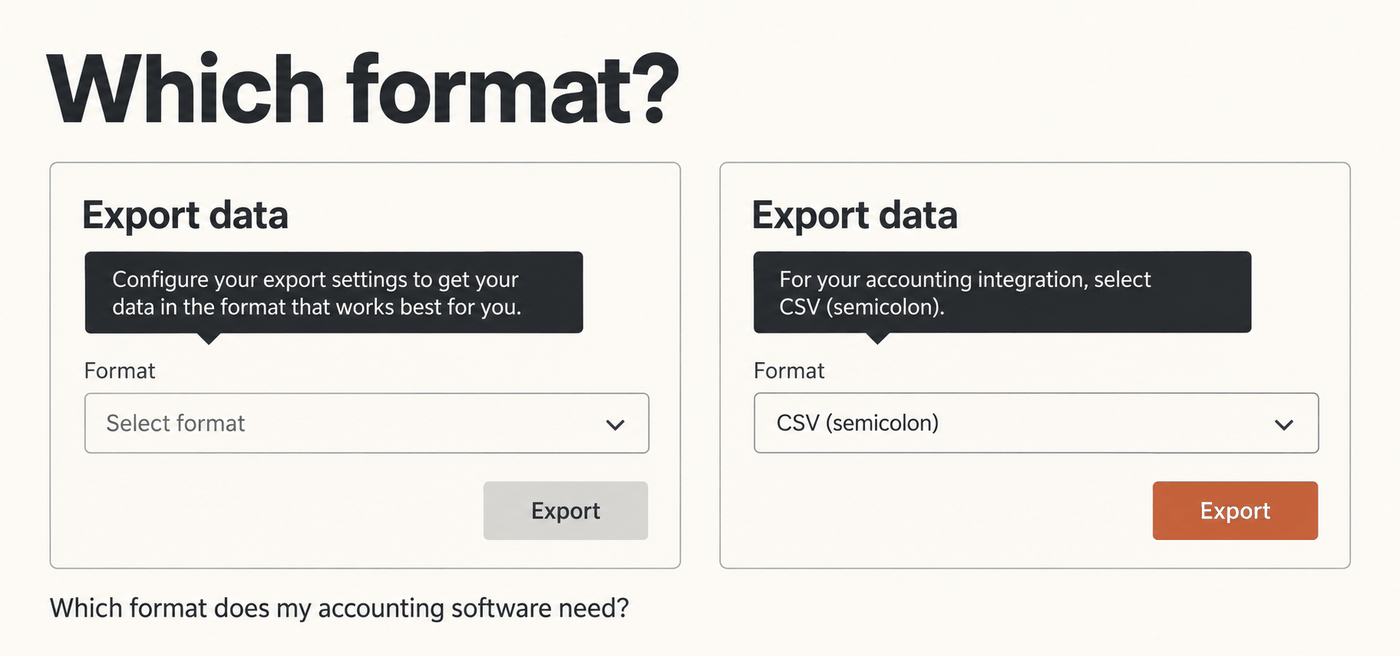
A user opens the export dialog. The tooltip says: Configure your export settings to get your data in the format that works best for you. She still doesn't know which format her accounting software accepts, so she opens a ticket.
A support agent replies that the accounting integration needs CSV with semicolons as separators. Two weeks later, another user asks the same question. A different agent answers it in different words.
Help at the point of export could have answered her question before she opened a ticket.
What good help delivers
Good help leads to more satisfied users, better adoption and a lighter support load.
Users can finish the task. With clear help at the export dialog, the user from the example picks the right format and completes her export without waiting for support. She has her file when she needs it. The next time, she runs the export on her own.
Being able to complete a task without unnecessary delays contributes to satisfaction. Help also makes unfamiliar features easier to use. Users can start using more of the product without needing someone to walk them through it.
Support answers fewer recurring questions. When the product explains which format to choose, fewer users need to ask. Agents spend less time repeating an explanation that could have been written once.
Onboarding gets consistent. When onboarding depends on whoever gives the demo, every new customer gets a slightly different version. Help that states the steps once gives every new user the same starting point. Users can return to those instructions when they carry out the task themselves.
Writing and maintaining help
Help needs to be clear when users read it and manageable when the product changes.
Precise text makes help understandable. Compare these two instructions:
- Use the export options to download your data.
- To import the file into your accounting software, select CSV (semicolon). Then click Export.
The first has to be interpreted. The second tells the user which option fits her situation and what to do next.
Central source management makes help maintainable. A precise text copied into six places becomes six texts. A correction means finding and changing all six. When help is managed as one source, a correction can reach every place that source is used. Managing and publishing that content outside the code also lets a writer fix a sentence without waiting for a software release.
Good writing alone doesn't give you that. Even well-written text becomes difficult to keep consistent when its copies are maintained separately.
This second mechanism is the layer HelpCCMS handles. Content is managed outside the code and published under stable help keys. Your application decides where, when and for whom it appears. The same source can feed a tooltip and an onboarding step, although writing one text that works in both places takes some care.
Every unit has a function
One rule sits behind precise help: every unit has a function. A help topic has a goal and a result for the reader. Every section, sentence and step contributes to that result. Whatever doesn't contribute goes. That includes repetition, generalities, feature marketing and background nobody needs to act.
The task. Decide what the text must achieve before you write it. A topic on inviting a colleague needs the steps and what the colleague receives. It doesn't need the history of your permission model.
The sentence. One sentence carries one message. Click Save to store your changes, which also updates the preview and notifies your team carries three. Split them, or drop the ones the reader doesn't need.
The step. One step is one action, and it starts with a verb. Prerequisites come before the steps. The result comes after them, when knowing it helps the user.
The term. Use the label that is on the screen, exactly. If the button says Archive, the help doesn't say move to storage. Use one term for one concept, everywhere.
The error message. Say what went wrong and what the user can do now. Export failed: the file exceeds 50 MB. Select a shorter date range and try again.
Each of these gets its own article in this series.
People and machines
Help that is well written and well organised is also more useful to machines. People and AI assistants process text differently. They still benefit from the same properties.
An explicit prerequisite tells a user what to check first. It also gives an assistant the information needed to answer what do I need before I can do this? Using the same term in the interface and the help lets users recognise what the text refers to. Consistent terminology also helps retrieval by keeping references to the same concept consistent. A step with one action is easier to follow and easier to extract as an individual instruction.
Clear writing and explicit structure help users understand the content. They also give assistants better material to work with.
HelpCCMS makes published content readable for agents through MCP. Pro can also publish the structure itself as metadata, such as prerequisites, steps and results. The last article in this series covers what that adds.
Where to start
Pick the question your support team answers most often. Find the help text that should have answered it, if there is one.
- Write down what that text must let the user do.
- Check whether users see the text at the moment the question comes up.
- For each sentence, ask what it contributes. Remove the sentences that contribute nothing.
- Check every UI label against the screen.
- Add the missing answer.
Then watch whether the question keeps coming back.
Look at your help as a whole
Is your help content supporting users as well as it should? I help teams assess and improve their help as a whole: what it covers, how it is structured, where users find it and how it stays current.
Get in touch to discuss your help content and what you need it to achieve.